Streamlining content publishing in Drupal: giving editors a real preview
A New York–based chain of hospitals publishes constantly: new studies, treatment information, clinic locations, articles. The site runs on Drupal, and the publishing is done by a marketing and communications team, not by developers. They build pages from a component library — a banner with a heading over an image, a media-and-text block, a CTA block — built with Paragraphs and dropped into rich-text fields with Paragraphs Entity Embed.
The trouble is that inside the editor, a component doesn't look anything like the component. An editor placing a visual with a heading over it can't tell whether the spacing is right or whether the text will read against the image. So they publish, check the live page, adjust, publish again — and when it still comes out wrong, it goes to a developer. A routine content update has now cost an afternoon of editor time and a slice of an engineer's week.
We fixed the reason the editor couldn't render the component, and released the fix on drupal.org as Paragraphs Entity Embed Assets.
What the editor actually sees
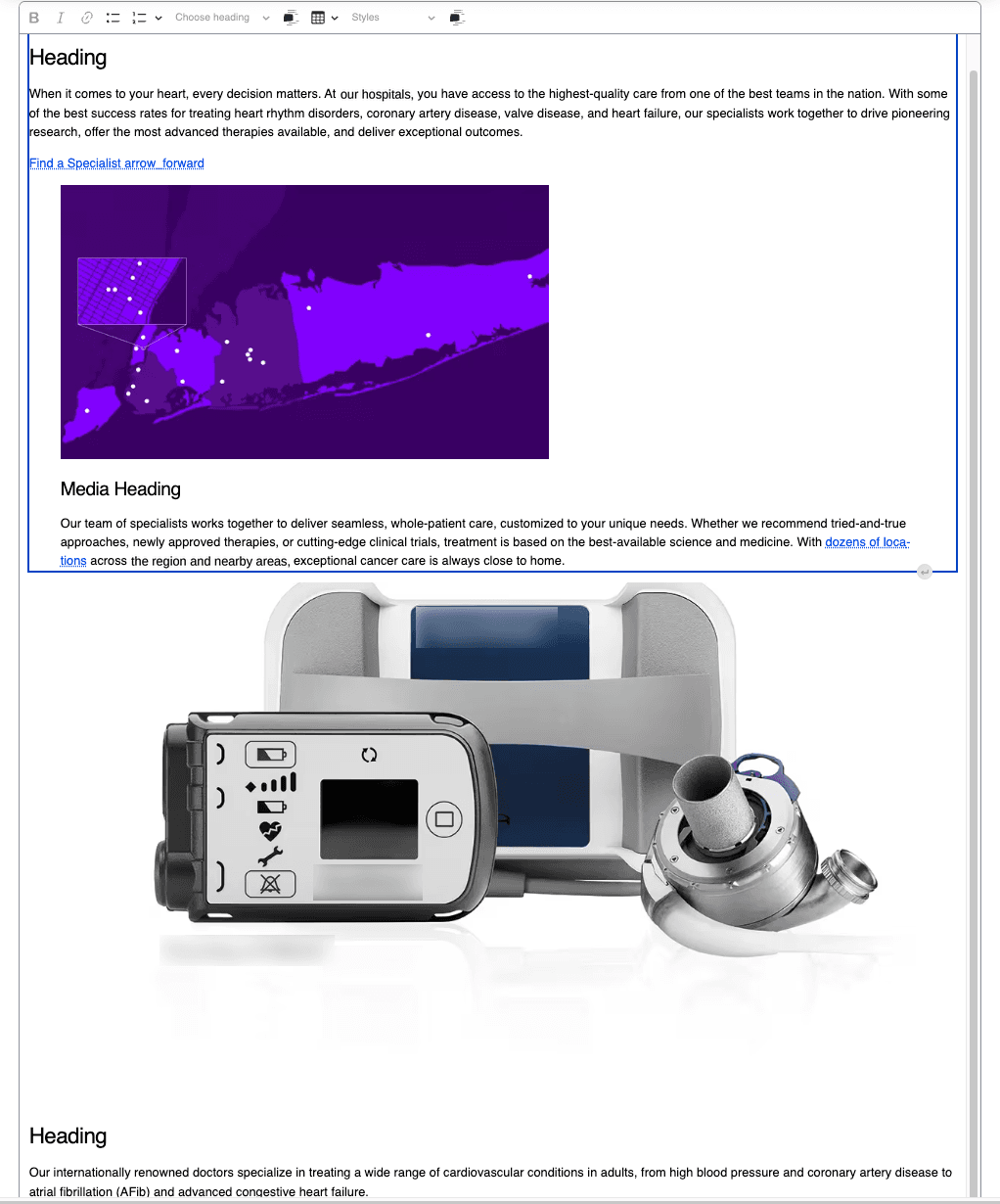
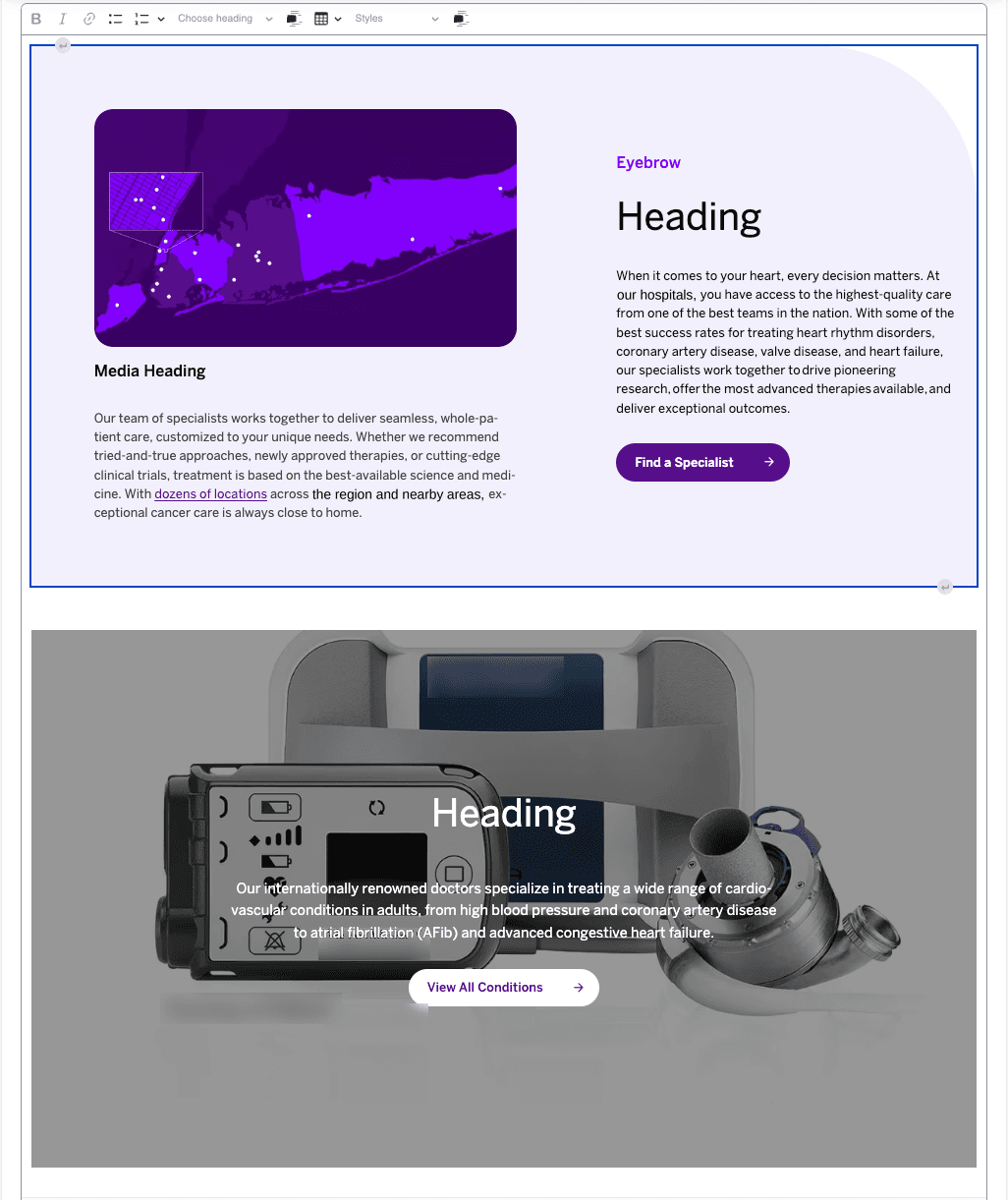
A Paragraph with a title, short title, description, media reference and CTA renders in the editor as five fields stacked one after another. Place three components in a row and that's fifteen stacked fields with no boundary between them — as Alen Simonyan, the module's author, puts it, the editor can't tell where one paragraph ends and the next begins. Spacing, overlays, whether a heading reads against the image behind it: none of it is visible until the page is saved and opened on the front end.
Why the gap exists
On the rendered page, everything works as expected: the Paragraph renders through its view mode, the theme attaches the component's libraries, and the CSS and JavaScript that make it a component are there.
Inside CKEditor, they aren't — and it's a context problem, not a timing one. Paragraphs Entity Embed renders the embedded Paragraph server-side through the normal render pipeline. CKEditor 5 receives finished HTML during its data-to-view conversion, so the markup is correct from the moment it appears.
What's missing is everything Drupal normally attaches alongside that markup. Outside the editor, the request that renders the Paragraph also collects its #attached libraries and prints the matching link and script tags. Inside CKEditor, the surrounding page is the admin theme. Only the admin theme's own libraries get attached, so the front-end theme's CSS and JS never make it into that request.
Why the built-in options aren't enough
Drupal does ship a mechanism for this. A theme can declare ckeditor5-stylesheets in its .info.yml and those files load into the editing area. For simple typography, that's often all you need.
It runs out of road quickly for component-based builds:
- It's all or nothing. Every text format gets the same stylesheets, whether or not the components are usable there.
- It's CSS only. Components that need JavaScript to look correct get nothing.
- There's no scoping to particular embed buttons or Paragraph types, so you either load everything or load nothing.
- Pulling full front-end theme CSS into the admin interface invites collisions with the admin UI itself.
That last one isn't hypothetical — it's what pushed this module toward CKEditor's own scoped stylesheet pipeline. An earlier version injected component CSS as normal <link> tags into the admin page head. Because CKEditor 5 in Drupal uses a contenteditable div in the main document rather than an iframe, those styles weren't confined to the embedded Paragraph preview. They bled into the rest of the edit form. The module's README documents the failure mode plainly:
Component CSS injected as
<link>tags directly into the page<head>broke the admin UI because those tags style the whole page, not just the editor.
That's why the released implementation alters internal.drupal.ckeditor5.stylesheets in paragraphs_entity_embed_assets_library_info_alter() instead of attaching front-end CSS globally.
What the module does
Paragraphs Entity Embed Assets lets you control which theme component assets — CSS and JavaScript — are loaded into CKEditor, scoped to the Paragraphs Entity Embed buttons that need them.
In practice:
- You mirror one or more themes, and the module discovers their component stylesheets and scripts for you.
- Both CSS and JavaScript are supported, so components with behavior render with that behavior.
- Assets are scoped by embed button and Paragraph type, so a text format only loads what its editors can actually place.
- Editor styles stay isolated from the Drupal administration interface.
- Asset selection uses Tagify for autocomplete, which matters when a theme has dozens of components.
How it works
Discovery is derived, not hand-built. An administrator selects which themes to mirror, and the module resolves the component stylesheets and scripts from them. The settings form then shows what it found, per Paragraph type, so you can remove specific files or add custom ones — Tagify autocompletes against real files (components/accordion/accordion.css) rather than making anyone type paths from memory.
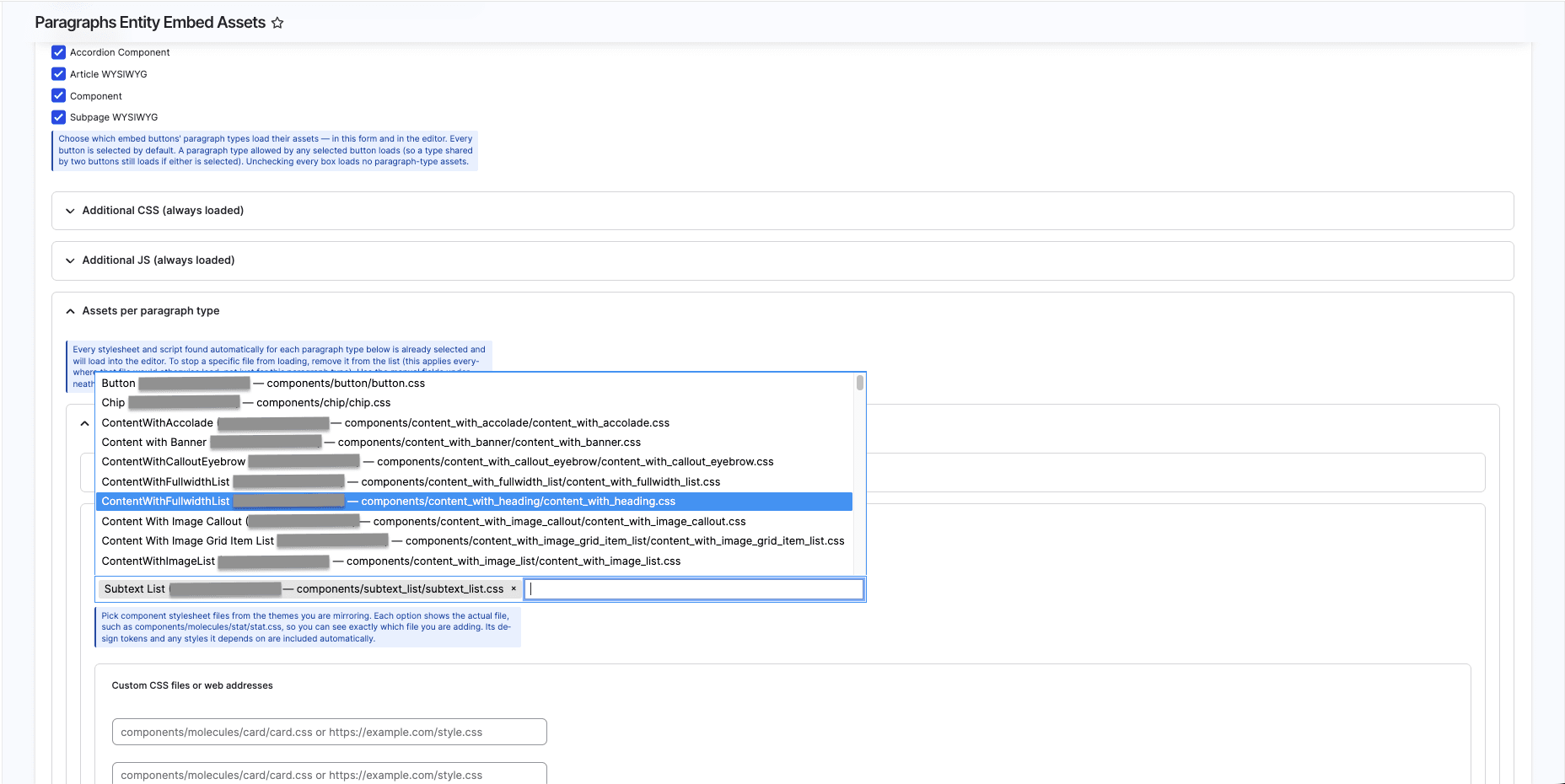
/admin/config/content/paragraphs-entity-embed-assets. Embed buttons are selected at the top; below, each Paragraph type shows the stylesheets discovered for it, ready to be trimmed or extended.Attachment happens on the Drupal side, not inside a custom CKEditor 5 plugin. Two hooks in paragraphs_entity_embed_assets.module do the work.
The first augments CKEditor 5's internal libraries so the module's editor.init behavior is always present, and appends every resolved stylesheet to CKEditor's own scoped stylesheet list:
function paragraphs_entity_embed_assets_library_info_alter(array &$libraries, string $extension): void {
  if ($extension !== 'ckeditor5') {
    return;
  }
  if (isset($libraries['internal.drupal.ckeditor5'])) {
    $libraries['internal.drupal.ckeditor5']['dependencies'][] = 'paragraphs_entity_embed_assets/editor.init';
  }
  if (isset($libraries['internal.drupal.ckeditor5.stylesheets'])) {
    $resolver = \Drupal::service('paragraphs_entity_embed_assets.assets_resolver');
    foreach ($resolver->getEditorCss() as $path) {
      $libraries['internal.drupal.ckeditor5.stylesheets']['css']['theme'][$path] = [];
    }
  }
}
The second delivers JavaScript to each CKEditor 5 text format through drupalSettings, because scripts need to execute in the page context rather than through CKEditor's stylesheet pipeline:
function paragraphs_entity_embed_assets_editor_js_settings_alter(array &$settings): void {
  if (empty($settings['editor']['formats']) || !is_array($settings['editor']['formats'])) {
    return;
  }
  $resolver = \Drupal::service('paragraphs_entity_embed_assets.assets_resolver');
  $inline_css = $resolver->getInlineCss();
  $inline_js  = $resolver->getInlineJs();
  $js         = $resolver->getEditorJs();
  $editor_storage = \Drupal::entityTypeManager()->getStorage('editor');

  foreach ($settings['editor']['formats'] as $format_id => &$format_settings) {
    $editor = $editor_storage->load($format_id);
    if (!$editor || $editor->getEditor() !== 'ckeditor5') {
      continue;
    }
    $bucket = [];
    if ($js) { $bucket['js'] = $js; }
    if ($inline_css !== '') { $bucket['inlineCss'] = $inline_css; }
    if ($inline_js !== '')  { $bucket['inlineJs']  = $inline_js; }
    if ($bucket) {
      $format_settings['paragraphsEntityEmbedAssets'] = $bucket;
    }
  }
}
Behind both hooks sits the assets resolver, whose public API shows the shape of the configuration the module works with: getMirroredThemes(), getEmbeddableBundles(), getEditorCss(), getEditorJs(), getInlineCss() and getInlineJs(). Bundle-specific assets are derived from the saved theme selection plus an optional embed_buttons filter in paragraphs_entity_embed_assets.settings.
Isolation is what keeps all of this out of the rest of the admin UI. Routing stylesheets through internal.drupal.ckeditor5.stylesheets means CKEditor scopes them to its own .ck-content container rather than the page. And assets load only on formats where a Paragraphs Entity Embed button is active — never globally. A front-end stylesheet reaches the one editor instance that needs it, and nothing else on the admin page.
Setting it up
Requirements: Drupal 10.3 or later (Drupal 11 supported), the Paragraphs and Paragraphs Entity Embed modules, the Tagify library, and at least one Paragraphs Entity Embed button already configured.
composer require 'drupal/paragraphs_entity_embed_assets:^1.0'
Then go to /admin/config/content/paragraphs-entity-embed-assets:
- Select the theme or themes to mirror. The module resolves component assets from them.
- Choose which embed buttons load their assets. Every button is selected by default. A Paragraph type allowed by any selected button will load, so a type shared across two buttons still loads if either is selected.
- Review the per-Paragraph-type asset lists. Everything discovered is pre-selected. Remove a file to stop it loading — note that removing it applies everywhere that file would otherwise load, not just for that one Paragraph type.
- Add anything the scan missed using the custom CSS and JS fields, which accept either a path (
components/molecules/card/card.css) or a full URL. - Save.
Now open a node using that text format and embed a Paragraph as usual. An accordion component that previously showed as a stack of raw headings and body text will collapse and expand exactly as it does on the live page, because its CSS and JS are loaded into that editor instance.
Limitations worth knowing
A few things to weigh before relying on this in production.
JavaScript that assumes a full front-end page can misbehave in the editor's more limited context — code that reads global page state, attaches to document.body, or expects other page-level libraries to be present. Components built that way may need a CKEditor-specific guard before you enable them.
Attaching many libraries to one text format adds real weight to every editor instance using it. Be selective rather than enabling every component just in case.
The module is new. Less common configurations — a button shared across several Paragraph types, or components with deeply nested library dependencies — haven't been exercised as heavily as the common path. The issue queue is the right place to report what you find.
It is not covered by Drupal's security advisory policy, which is standard at this stage. Review it as you would any contributed code before putting it on a production site.
Results
The publish-check-adjust loop is gone. Editors place a component and see it the way it will appear on the page, so spacing and overlay problems get caught while the page is being built rather than after it goes live. Pages that used to take several rounds go out in one.
Developers stopped receiving tickets for problems that were never really engineering problems. The content team owns the whole job again — which is what the component library was supposed to give them in the first place.
And because assets are configured per embed button and Paragraph type, adding a new component to the library is a change on one settings form rather than another round of asking why the editor looks wrong.
Written by Alen Simonyan, Senior Drupal Developer at Lineate.
Share:
Got a project?
Harness the power of your data with the help of our tailored data-centric expertise.
Contact Us